When I first joined my current project, we were in the Elaboration/Construction phase. My job was to prototype the UI component (web pages) using a tool called Axure RP Pro.
Prototyping AdvantagesThe advantages of prototyping are that it allows direct user involvement with the functionality of the system from the beginning. This allows the user to determine that the use cases are being modeled correctly and the system is performing to their expectations as they are able to see the visualisation and simulation of the requirements and use cases.
Not only is prototyping advantageous to the user, it is also very helpful for the developer as they are receiving iterative feedback which means that the turnaround will be rapid when developing the real system. It also allows them to assess any future enhancements and determine any foreseeable issues for the future.
In terms of documentation, prototyping is self documenting as the pages can be annotated.
Prototyping is throw away code, it is easier to throw away and start again. It is very important to have that option at start of analysis, as continuing down the wrong track due to a lot of investment in developing screens, is generally, a bad idea.
Prototyping Disadvantages
Prototyping has many advantages, but along with the advantages there are disadvantages.
What tends to happen with prototypes is that users and developers forget that it is a throw away system and become very involved in the development of the prototype. They get caught up in getting the aesthetics right instead of focussing on the functional side and become too attached to the system. They lose sight of the fact that prototyping is to demonstrate the functionality and UI as a mock up system.
After involvement with the prototype the user can end up expecting the real system performance to be the same as the prototype. They overlook that in the real system there will be large volumes of data and other system issues like infrastructure, high volume of users accessing the servers etc.
Prototyping on Our Project
It was decided to prototype the UI on the project as this would allow the client and us to work collaboratively in order to establish exactly what the client wanted. It allowed us to determine the scope of the project.
It also provided the client with a visual representation of the use cases and allowed direct involvement and feedback on the potential system.
We achieved the following through prototyping:
- Input from the client
- Collaborative working through the workshops
- Quick turnaround
Axure RP ProAxure RP pro is a RAPID tool for prototyping web pages. It is more like a drawing package than a development system. It maps a storyboard on the model of the system, it achieves this though the use of ‘Wireframes’ of web applications.
The web pages are created by dragging and dropping components onto the screen.
Axure allows the creation of ‘Masters’ which are essentially like templates (i.e headers and footers) in word.
Adding components such as text fields, images etc is relatively straight forward with the drag and drop feature. It is also possible to link to other pages within the project or external links using the side bar on the right hand side. It is just a matter of selecting the component and then from the side bar menu deciding the course of action and whether the action should occur on ‘mouse click’ or on mouse ‘hover’. Linking pages in Axure is like linking one slide to another in Powerpoint.
It is possible to make the web pages interactive; however this is very limited and usually requires a fair bit of work for complex functionality.
As this is a prototyping tool, one would want to demonstrate interactive functionality. In order to achieve this in Axure it is possible to use a dynamic panel. On the main page you would drag a dynamic panel, with a ‘save’ button. You would then need to modify the state, which is essentially like another page. Once you have created your confirmation in the state, you can then link the save button to that state
If the interactivity functionality is fairly simple and straightforward the dynamic panel feature works very well. The difficulty arises in trying to demonstrate complex functionality, such as a tree view menu. The reason being, if there are many items and sub items in this menu then all the permutaions in that state have to be created, which can ultimately result in having many states. Now, if the task is to create the menu and not to modify it at a later stage, although a lengthy process it can ultimately be worth the time and effort. The problem arises if there are constant requests to make modifications here and there, in which case they have to be manually updated for every single state.
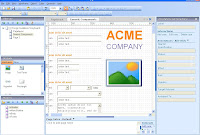 Fig 1: Axure RP Pro Editor
In order to view the ‘web page’ it needs to be built. This can be done as a single ‘chm’ file which is displayed as a help file or html pages with an index page.
When the files are compiled there is an option to generate them as CHM files or HTML files. Although in terms of viewing the web page the format doesn’t seem to make a difference, however the difference lies in that a CHM file is generated as a single help file whereas a HTML is generated with all the pages, images etc. So in terms of sending the files to the developers to create the pages it is easier to have a single CHM file.
 Fig 2: Built CHM File
 Fig 3: Built HTML File
Advantages of using this tool
Mock up of web pages and an interactive demo can be created very quickly.As the prototype can be viewed in a browser it can be sent out to the client, the Business Analysts and the developers.The prototype can be version controlled as it is a single self contained unit.Disadvantages of using this tool
- Everything is saved in a single .rp file even though a file can have multiple web pages this means that there is a lack of collaborative use and only one person can work on the file at any one time even if the multiple web pages are created by different people.
- If the .rp file is divided into two separate files so each developer can work on their web pages but needs to be integrated later on, this can prove difficult as it is a manual task as Axure does not allow importing other projects.
- If there is a consistent master across multiple .rp files and the master changes, the changes then have to be manually updated across the files.
- The final html/chm pages cannot be uses in the real system, so it is a completely throw away system.
Conclusion
- Prototyping is an iterative process that takes place at the Inception/ Elaboration phase
- Prototyping web pages is a quick and easy way that makes the development process easier, through user feedback
- Axure RP v4.6 Pro is a Rapid prototyping tool
- It allows the creation of interactive web pages using Wireframes
- It is easy to use
- It Lacks collaborative use
- New version (v5) meant to be far better


